Notes from your Teams calls, on a PCMurmeo for Windows
Murmeo records your calls and meetings on the PC, transcribes French on the PC and prepares the meeting notes.
Download for Windows See pricing
Free14-day Pro trial, no card neededWindows 10 and 11

Teams, Zoom, Meet and your meetings, on two tracks
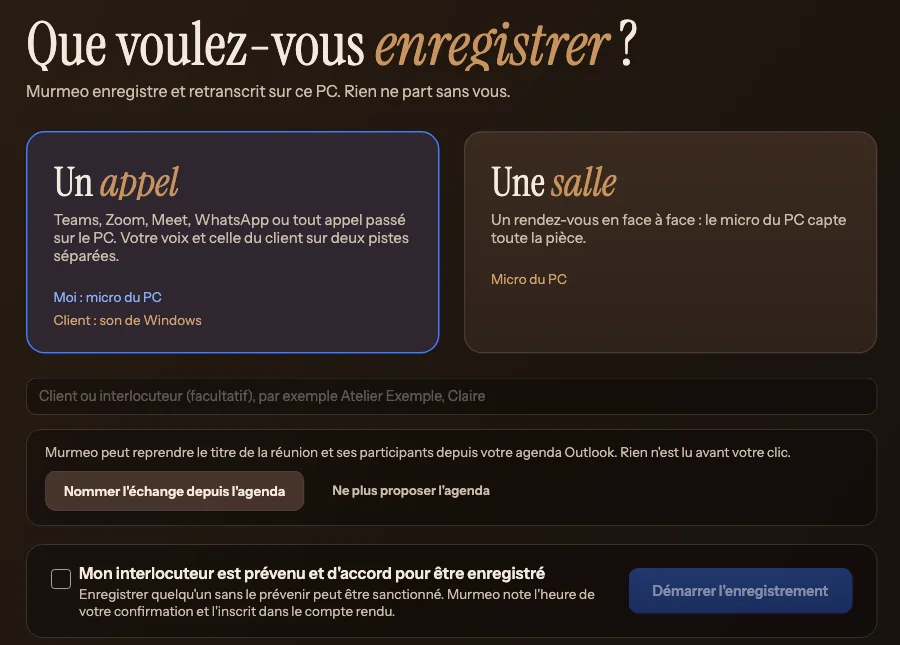
In “Un appel” (a call) mode, your voice goes through the microphone and the other person's through the calling app's sound, each on its own track. In “Une salle” (a room) mode, the PC's microphone picks up the whole room.
- Apps recognised
- Teams, Zoom, Webex, WhatsApp, Meet in the browser. The conversation is named accordingly, for example “Appel Teams”.
- Only the call's sound
- When Windows allows it. For Meet in the browser, or if Windows refuses, Murmeo captures all of the PC's sound and says so in the record.
- Consent first
- Until the box confirming that the other person has been told and agrees is ticked, nothing starts. The time of your confirmation is kept and printed in the PDF.
- Transcribed during the call
- On a PC with four cores or more, Murmeo already transcribes while recording: when you stop, only the end is left to process.
- If the PC stops
- The recording is written as it goes: the conversation is found at the next launch and the transcription resumes.
After the call, the summary in the conversation record
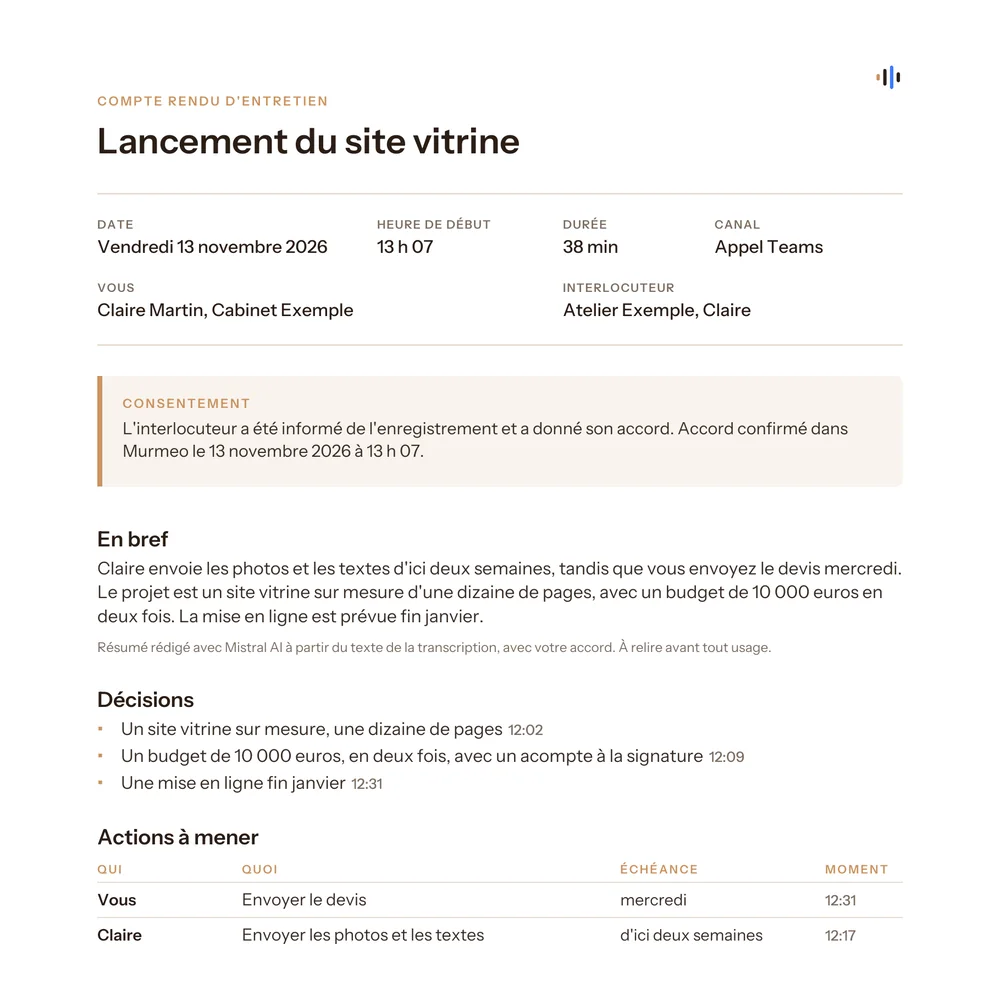
The key points, decisions, things to do (who, what, when), the figures and dates mentioned. It is written by the online AI of your choice, with your own key; read it before you use it.


The follow-up email Pro
Prepared from the summary, without AI. It opens in Outlook or the email app set in Windows, with the PDF report attached, or can be copied. Nothing is sent without you.
The dated PDF report Pro
Date, duration, channel, the other person's time-stamped consent and the fingerprint of the transcript, to keep in the client file.
Your conversations stay on the PC
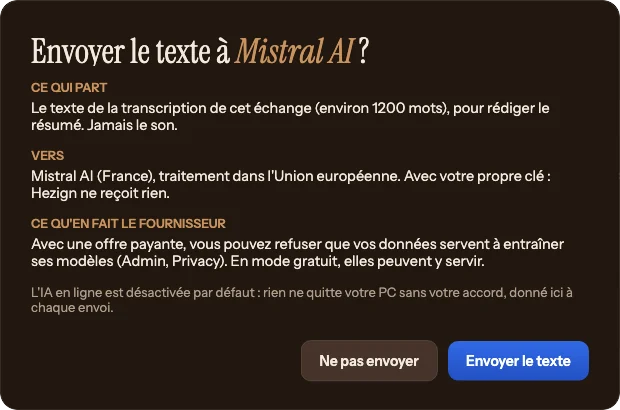
Murmeo has no account to create and no server that receives your conversations. For the summary, only the text is sent, to the AI you chose and after your agreement; the audio is never sent.
- 90 daysAudio is deleted after 90 days, the text stays. You delete a conversation whenever you like.
- Your keyKept in Windows Credential Manager, never in a file.
 Mistral AI
 Anthropic
 OpenAI
 Google Gemini
Windows has no on-device AI comparable to Apple Intelligence: on PC, the summary therefore always uses an online AI. Without a key, recording and transcription work. Connect an online AI
What changes compared with the Mac
Murmeo for Windows brings most of Murmeo for Mac, not everything.
| Feature | Mac, iPad, iPhone | Windows PC |
|---|---|---|
| Calls | Teams, Zoom, Meet, WhatsApp and any call made on the Mac, including iPhone calls relayed by the Mac | Teams, Zoom, Meet, WhatsApp and any call made on the PC |
| In-person meetings | Yes, Room mode | Yes, “Une salle” (room) mode |
| French transcription | On the device | On the PC, with Whisper |
| Summary | On the device with Apple Intelligence, or by an online AI with your own key | By an online AI with your own key, after your agreement before each send |
| Recording, transcription, summary | Free, without limits | Free, without limits |
| Follow-up email | Yes, with Pro | Yes, with Pro |
| Dated PDF report | Yes, with Advisers | Yes, with Pro |
| Draft quote, Reminders, client page and brief | Yes | No |
| Audio file import | Yes | No |
| Sync between devices | No, each device keeps its own conversations | No, your conversations stay on the PC |
| Subscription | App Store, with your Apple Account: Pro €9 a month or €79 a year, Advisers €19 a month | On murmeo.app, separate from the App Store: Pro €9 a month or €79 a year, dated PDF included |
| 14-day free trial | Through the App Store | In the app, with no card and no account |
Pricing on Windows
Recording, transcription and the summary are free, without limits. Murmeo Pro adds the follow-up email and the dated PDF report.
Free
€0
No account, no limits
- Recording without limits
- French transcription on the PC, without limits
- Summary without limits, by an online AI with your own key, after your agreement before each send
Pro
€9 a month
or €79 a yeara €29 saving every year
- Everything in Free, plus:
- Follow-up email
- Dated PDF report, with the other person's time-stamped consent
14 daysPro trial, no card needed
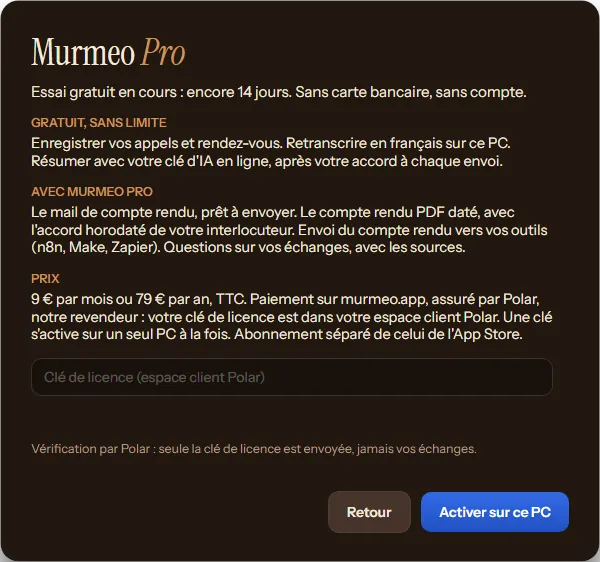
- The trial starts the first time you open Murmeo on your PC. No card, no account, no email address.
- The follow-up email and the dated PDF are open during the trial; the days left show at the bottom of the left-hand column.
- At the end, nothing is charged. Recording, transcription and the summary stay free, and your conversations stay on the PC.
- Prices include VAT. Payment handled by Polar, merchant of record for the order: they take the payment, send the receipt, apply VAT and pay refunds.
- First payment refunded in full on request within 14 days.
- Cancel at any time, from your Polar customer portal.
- A key works on one PC at a time, for one person. To change PCs, you free up the old one yourself, in Murmeo or from your Polar customer portal.
- The App Store subscription does not work on Windows, and vice versa.
Activate your licence key
- Get Murmeo Pro on Polar's payment page, from this page or with the “Acheter sur murmeo.app” (buy on murmeo.app) button in the app.
- Copy your licence key (it starts with MURMEO) from your Polar customer portal.
- In Murmeo, click “J'ai une clé” (I have a key) on the Murmeo Pro screen, at the bottom of the left-hand column or in the settings, paste the key, then “Activer sur ce PC” (activate on this PC).
Activation needs a connection: only the key and the PC's name are sent to Polar, never your conversations. Murmeo then checks the key at most once a day and keeps working for 7 days without a connection. A question about your key or your invoice: bonjour@murmeo.app.
Install Murmeo on your PC
The button at the top picks the right version. To choose yourself: Settings, System, About, “System type” line.
- x64Download for x64 PCsMost PCs: Intel or AMD processor.
- ARM64Download for ARM64 PCsPCs with an ARM processor, such as Snapdragon.
On first launch
Murmeo for Windows does not have a digital signature yet: on first launch, the SmartScreen filter shows “Windows protected your PC” and the publisher appears as “Unknown publisher”. This is expected for this file. Signing is planned for a future version.
- Click “More info”.
- Check that the app is called MurmeoApp-win-x64-Setup.exe or MurmeoApp-win-arm64-Setup.exe and that you downloaded it from this page. If not, do not open the file and write to us.
- Click “Run anyway”.
Murmeo is only downloaded from this page: we do not distribute it anywhere else.
System requirements
- Windows
- Windows 10 (version 22H2) or Windows 11
- Processor
- A recent x64 with AVX2 (Intel, AMD), or ARM64. Four cores recommended
- Memory
- 8 GB, 16 GB recommended for the “Précis” (accurate) model on long meetings
- Disk
- 2 GB free
- Microsoft component
- “Microsoft Visual C++ Redistributable”, free, used for transcription. If it is missing, the Murmeo installer adds it, with the approval of an administrator of the PC
- Connection
- To download the transcription model on first launch (“Rapide”, 264 MB, or “Précis”, 574 MB, checked against its fingerprint) and for the summary
- Headset
- Recommended: without one, the other person's voice can come back into your microphone. Murmeo uses Windows echo cancellation to limit it
Frequently asked questions
Does my Apple subscription work on Windows?
No. A subscription taken on the App Store works on Mac, iPhone and iPad, with the same Apple Account. On PC, the subscription is taken on murmeo.app. They are two separate subscriptions, each paid on its own.
Is the summary made on the PC?
No. Transcription happens on the PC, but the summary uses an online AI, with your own key: Mistral AI, Anthropic, OpenAI or Google Gemini. Murmeo shows you what is sent and to whom, and asks for your agreement before each send. Only the text is sent, never the audio.
Do my recordings go online?
The audio, never: it stays on your PC and is deleted after 90 days. The text is only sent to the AI you chose, for the summary, and only after your agreement. Murmeo has no account to create and no server that receives your conversations.
Which version should I pick, x64 or ARM64?
Most PCs are x64 (Intel or AMD processor). PCs with an ARM processor, such as Snapdragon, take the ARM64 version. The “Download for Windows” button chooses for you when your browser says which one you have; otherwise, look at “System type” in Settings, System, About.
Can I find my Mac conversations on the PC?
No. There is no sync between the Mac, iPhone, iPad and PC: each device keeps its own conversations.
Is the Windows app in English?
No: Murmeo for Windows is in French, and it transcribes conversations in French.
How do I cancel my Windows subscription?
At any time, from your Polar customer portal (https://polar.sh/harry-porcu/portal). Cancellation takes effect at the end of the period already paid. If anything goes wrong, write to us at bonjour@murmeo.app.
Murmeo for Windows is an app for PC (Windows 10 or 11, x64 or ARM64) made by Hezign (Harry Porcu, sole trader), in France. The app is in French and transcribes French. Updated 17 November 2026.
Got a question?
Email me, I'll get back to you.

Harry PorcuDesigns Murmeo, in France.
bonjour@murmeo.app